Canvas Hack Extension
Cheat on any Canvas quiz.
Open a quiz, press the Canvas Hack Extension button, and the answer appears under the question. You stay on the page the whole time, and it handles Classic Quizzes and New Quizzes the same way.
Discreet mode
Prefer a quieter quiz page? Discreet mode swaps the purple Get Answer button for a small, faint icon and shows the answer in small plain text. Works on Classic and New Quizzes.
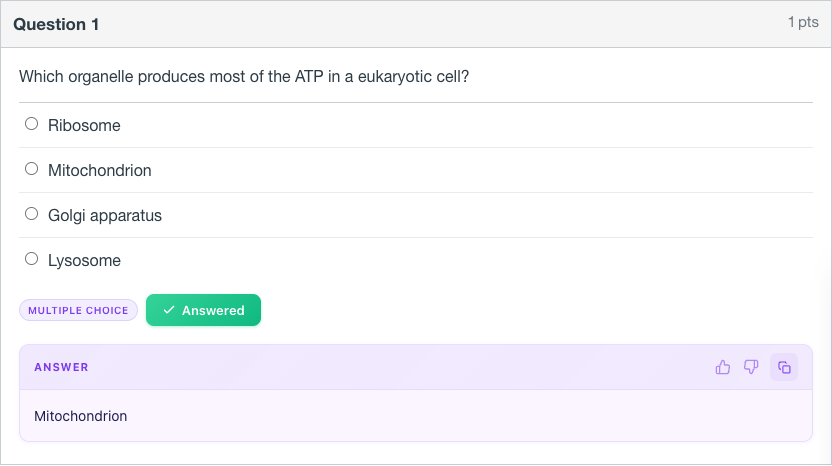
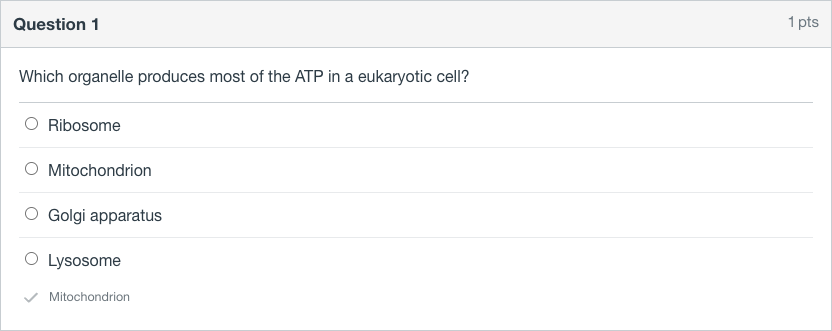
On by default. Turn it off with one switch in the extension popup.
Works with Classic and New Quizzes
Point the Canvas Hack Extension at any common question format and it hands back the answer inside Chrome. Both the Classic Quizzes engine and the newer New Quizzes engine are covered.
- Multiple choice
- True or false
- Short answer
- Fill in the blank
- Matching
- Numerical and essay
- Ordering
- Categorization
Students across 128+ campuses reach for it every exam week.
Real reviews pulled from the Chrome Web Store listing.
"our whole department switched to new quizzes and every other tool just broke. this one still works"
"tested like four extensions, none of them touched the new canvas format. this reads all of it, matching included"
"no joke this saved my semester 😭 had three quizzes dropping at midnight and i was DONE. so worth it"
"easily the best canvas extension out there, nothing else is close"
"should have had this since freshman year instead of finding it as a senior. rip every point i threw away"
"would happily pay for this again, 10/10"
"There is no way I pass midterms without this. Cannot recommend it enough."
"Got me through some rough questions in my marketing class. The answers held up."
"Runs fine on my university's Canvas. Nailed most of my biology test. Genuinely handy."
How does it stack up?
Quiz Loader and Canvas Helper each cover a single job. This table lays out where the Canvas Hack Extension goes further.
| Capability | Canvas Hack Extension This extension | Quiz Loader & Canvas Helper |
|---|---|---|
| Gives you the actual answer | check_circle | ✕ |
| Backed by a private Canvas quiz library | check_circle | ✕ |
| No credits, no usage cap | check_circle | ✕ |
| Runs inside the Canvas page | check_circle | check_circle |
| Never makes you switch tabs | check_circle | ✕ |
Unlimited quizzes on every plan.
The free answers can run out in the middle of a quiz. Activate for unlimited answers, so it never stops you halfway.
Cancel anytime.
$12.25/month, billed every 4 months.
You save $10 a semester.
Renews every 4 months. Cancel anytime.
Free answers can run out mid-quiz
Unlimited answers Classic + New Quizzes All question types Any computer
7-day money-back guaranteeNot happy? Email support@canvasquiz.com within 7 days of your first payment for a full refund.
- Secure payment by Stripe
- Setup email the moment you pay
Already subscribed? Sign in
After you pay
- You go straight to a setup page, and we email you the setup link too.
- Add the Canvas Hack Extension to Chrome when the page asks. It signs you in by itself.
- Open your quiz and click the small icon under a question (a Get Answer button with discreet mode off). Already have the extension? It unlocks right away.
Common questions, answered
The things students ask most before they add the Canvas Hack Extension.
What is Canvas Hack Extension?
The Canvas Hack Extension is a Chrome extension that answers Canvas quiz questions for you with AI, right on the quiz page.
How do I get answers on a Canvas quiz?
Add the Canvas Hack Extension from the Chrome Web Store, open your quiz, and press the small icon under a question. The answer drops in right next to it, and you never leave the tab.
Does Canvas Hack Extension work with Classic and New Quizzes?
Yes. The Canvas Hack Extension was built to read both the Classic Quizzes format and the newer New Quizzes format.
What Canvas question types does Canvas Hack Extension support?
It reads the common Canvas formats: multiple choice, true or false, short answer, fill in the blank, matching, numerical, essay, ordering, and categorization.
How do I install Canvas Hack Extension?
Grab the Canvas Hack Extension from the Chrome Web Store, then open any Canvas quiz. It works from inside the quiz page itself.
Is Canvas Hack Extension free to install?
Yes. The Chrome Web Store install costs nothing. Add it, open a quiz, and press the icon under a question. To answer without limits there are two plans: $14.99 a month or $48.99 every 4 months. Every plan has a 7-day money-back guarantee, and you can cancel whenever you want.
I already subscribe. Does my price change?
No. Any active subscription keeps its current rate for as long as it stays active. New pricing only touches new sign-ups.
How do I cancel Canvas Hack Extension?
Open the Canvas Hack Extension and hit Manage subscription. That takes you to the billing portal, where you can cancel it. Your access runs until the end of the period you already paid for.
Still stuck on something? Write to support@canvasquiz.com and you will hear back within a day.
Walk into your next Canvas quiz ready.
Line up with the 15,000+ students who already run the Canvas Hack Extension.